Invoices and payments
Who this is for: customer portal users and accounts teams.
What you will learn: how to read an invoice, download it, pay it and raise a query.
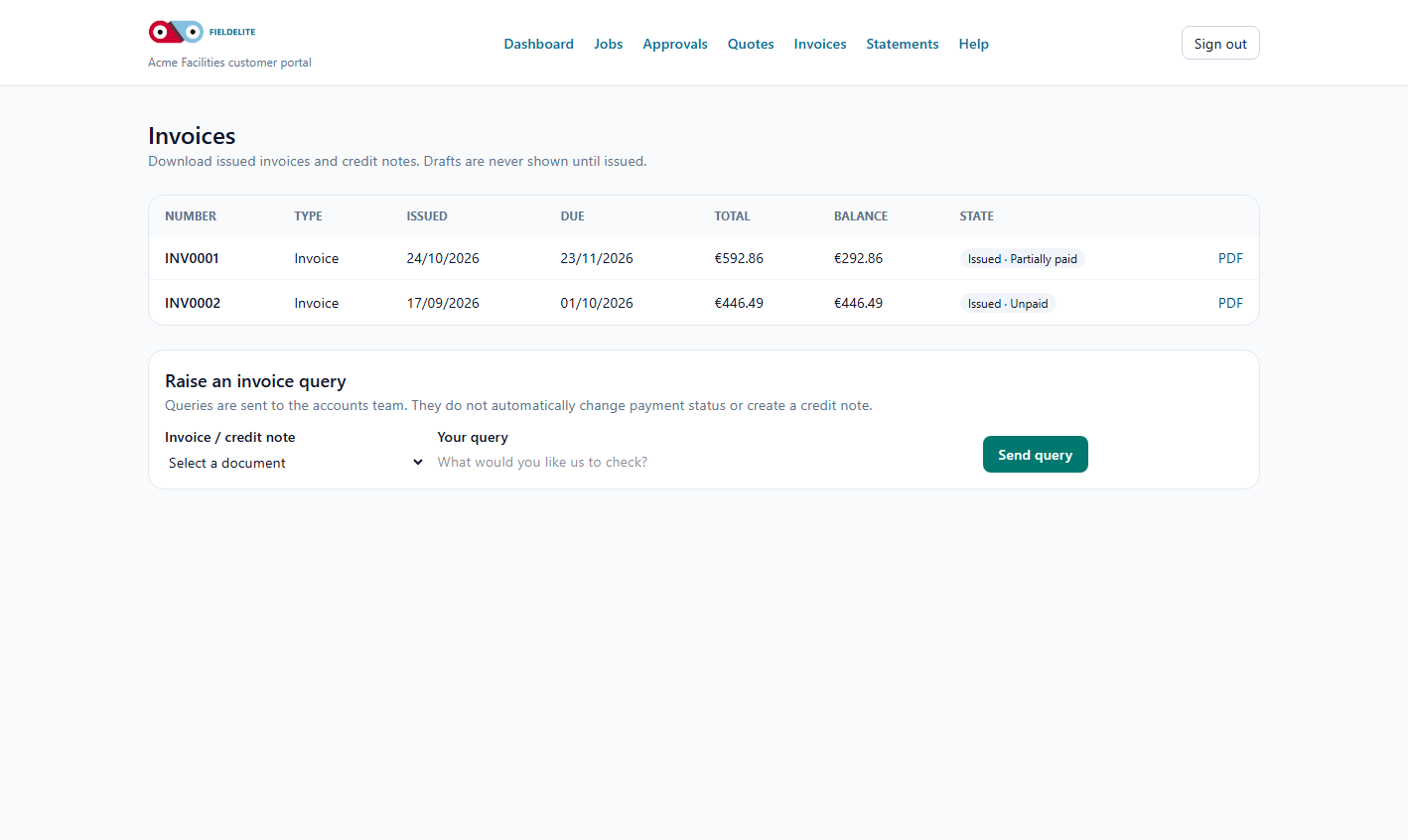
Open an invoice
- Select Invoices.
- Open the invoice.
- Check:
- invoice number
- issue date and due date
- PO or reference
- lines and quantities
- VAT
- amount paid and balance
Publication: the portal lists only issued invoices and credit notes that are intended for customers. Drafts and internal working documents are never shown, cannot be queried, and cannot be downloaded from the portal.
Download the PDF
- Open the invoice.
- Select Download PDF.
- Send it to your finance team or file it in your accounts system.
Issued invoices are frozen. If something is wrong, the provider must issue a credit note and a corrected invoice; they cannot silently edit the original.
Pay an invoice
If your provider has enabled card payments, the invoice list shows Pay now for an outstanding invoice.
- Select Pay now.
- Complete the payment on the provider's secure checkout page.
- Return to the portal. The invoice updates only after the payment provider confirms settlement to FieldElite.
- If the card page is cancelled, nothing is charged.
A browser redirect or success page is not proof of payment. If your provider has not enabled card payments, use the bank details on the invoice:
- Quote the invoice number as the payment reference.
- Allow for bank clearing time.
- The provider records the payment and the balance updates.
Raise a query
If a line, price or PO is wrong:
- Open the invoice.
- Select Raise a query.
- Describe the issue clearly.
- Send it.
A query tells the accounts team to look at the invoice. It does not automatically mark the invoice as disputed or paid. Keep paying undisputed amounts.
Understand the states
| State | Meaning |
|---|---|
| Issued | Legally raised, awaiting payment |
| Partially paid | Some money received |
| Paid | Balance settled |
| Overdue | Past the due date with a balance |
| Credit note | A credit reducing what you owe |
Tips
- Tip: Always use the invoice number as the payment reference.
- Tip: Download the PDF before querying; it helps your accounts team.
- Warning: Do not pay a statement total without checking the invoices inside it.
Check your understanding
- What should you quote when paying?
- What does raising a query do?
- Why can an issued invoice not be edited?
Related: Statements and documents · Account and support
Related articles
Who this is for: customer contacts with portal access. What you will learn: how to sign in, reset a password and keep your account secure. Before you start The portal address fro...
Who this is for: customer portal users. What you will learn: what the dashboard shows and where to go next. What you see Tile or section Meaning Outstanding balance Total u...
Who this is for: customer portal users. What you will learn: how to track jobs and download the service report. Find a job Select Jobs. The list is ordered by scheduled date, new...
Who this is for: customer portal users who approve work. What you will learn: how to review a quote, accept it, decline it and understand what happens next. Review a quote Select...