Feature
A field worker app that works when the signal does not
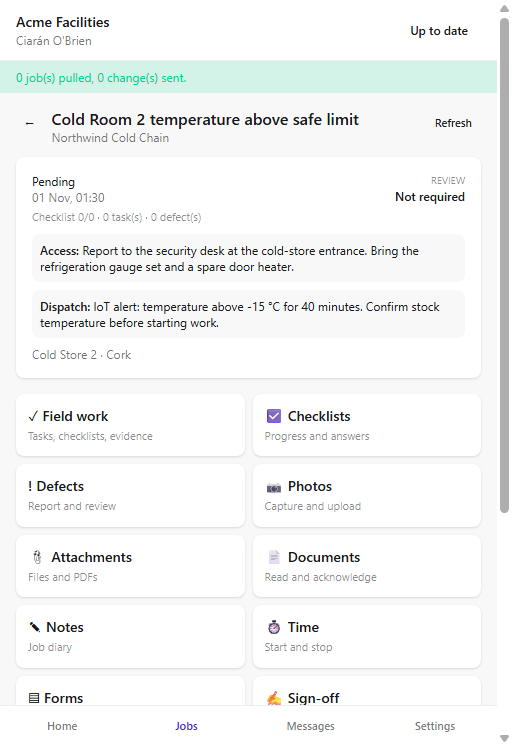
Give the engineer the job package, checklist, photos and sign-off on a phone. Sync when the signal returns.
The problem
A paper job sheet cannot show the access code, the last engineer's photo or the checklist the customer asked for. When the engineer is in a basement, the office phone becomes the integration layer.
What you get
Offline job package
The assigned job, customer, site, asset, checklist and documents download before the visit.
Photos and signatures
Capture before and after evidence and a customer signature on the device.
Checklists and forms
Complete the required record on site, with conditional questions and fail actions.
Visible sync state
Queued work is shown as pending until the server accepts it. The office can see what has not arrived yet.
How it works
Sign in to the workspace
The app shows the workspace host so a worker with two companies does not mix them up.
Download the day
The job package and reference data sync while the phone has signal.
Work the job
Complete the checklist, add photos, note parts and capture the signature.
Sync
Queued changes replay with a stable client id. A retry does not create a duplicate.
Works with
Questions about this feature
Is there an Android app?
Yes. The native Android app adds hardware features such as camera, NFC, Bluetooth and managed map packs where the device supports them.
Can it work on iPhone?
The installable PWA works on modern iPhone browsers and can be added to the home screen. Background sync is limited by iOS.
What happens if the app is closed?
Queued work stays on the device, but do not clear app data or uninstall the app while anything is pending.
Can workers see other customers?
No. The worker app shows the jobs and records the signed-in worker is allowed to see.
See it with your own jobs
Book a short walkthrough and bring one real job, site or contract.
Start your 30-day free trialKeep reading
Help articles for this feature
From the blog
A job loses context every time it changes hands. Here is how one connected record covers the customer, the site, the engineer, the evidence and the invoice — with a walk through the FieldElite demo workspace.
Most of the expense admin is not the approval. It is finding the receipt, reading it and retyping the same totals. OCR removes the retyping, but only if a person still checks the result.
A leak at a managed site becomes a scheduled job, a signed RAMS, photo evidence, an OCR receipt and a paid invoice.